

AI6YM
PicoFox - Open Source Fox Transmitter
Share


Features & Specifications
PicoFox is a tiny fox transmitter for the 2-meter band.
- Adjustable Power Up To 65mW.
- 10+ Hour Battery Life for all day fox hunts.
- Easy USB Programming no software needed, configuration is just text.
- Fully Open Source PicoFox is made to tinker.
- Upgradeable Design I/O expansion header enables endless modifications and upgrades.
- Transmits FM in the 144–148 MHz band (ITU Zone 1: 144–146 MHz).
- 1200mAh Built-In LiPo Battery (r2: 500mAh).
- Configured by editing a text file — no software or terminal needed.
- Transmits any 5kHz 16-bit PCM WAV file.
- Automatic Morse code ID with configurable tone, speed, and spacing.
- RF output up to 65mW (18dBm). Adjustable down to 0.1mW (-10dBm).
- Charges over USB-C (r3 can charge while off or while transmitting).
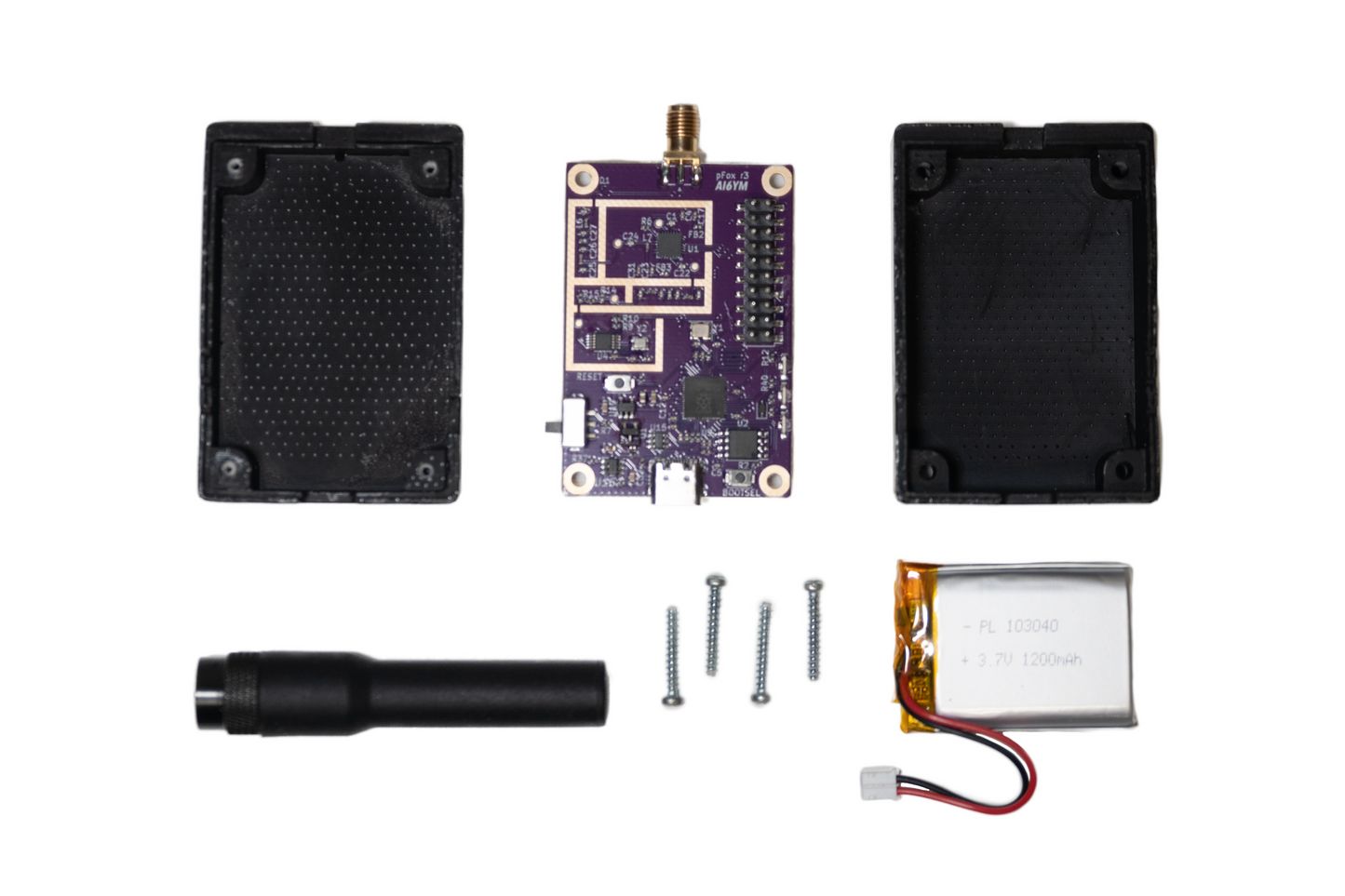
- Complete and fully assembled, including enclosure, rechargeable battery, and antenna.
Expansion header provides:
- 9 GPIO pins
- I2C, SPI, and UART busses.
- ADC
- Regulated 3.3V and battery voltage.
- 2 SI5351 clock outputs.
Upgrade footprint on the back side provides the same I/O and more (secret projects are in the works).
Further Reading
-
The PicoFox Saga: Chapter 2 - Revenge of the Spurs
This post was supposed to be short, just a quick update to say “I made a better PicoFox”. It was supposed to be a marketing piece driving sales, expressing gratitude to the community for great feedback, etc, etc, etc. What foolish thoughts I had! [continue reading]
-
The PicoFox Saga
Have you ever had an idea so spectacularly dumb you had to make it happen? After seeing several SI5351 based transmitters for HF I had the idea that maybe this chip could be pushed to do frequency modulation on VHF bands. It does glitchless frequency changes, it can generate VHF clocks, it even claims a ... [continue reading]
-
PicoFox GitHub
The PicoFox hardware design and firmware source code are freely available on GitHub. You’re free modify your PicoFox, transform it into something else entirely, or even build a PicoFox from scratch. Please respect the non-commercial license. For commercial use please contact justin@ai6ym.radio.
User Manual
Getting Started
To configure your PicoFox, connect it to any computer using a micro USB cable. It will appear as a USB mass storage device (like a flash drive). Open settings.txt with a text editor and adjust the configuration values as needed. Eject the drive and power cycle the PicoFox to apply the settings.
To reset to factory settings, delete settings.txt, eject the drive, and power cycle the PicoFox. A default settings file will be regenerated.
This manual applies to PicoFox r2 and r3. The r2 PicoFox has a lower output power and does not include the in-series attenuator (so the ATTENUATION configuration field does nothing).
Ports, Switches, and Indicators
Antenna (SMA-F) - Connect the provided rubber-ducky antenna or the antenna of your choice to the SMA port on top. The transmitter is robust to high-SWR so feel free to use a compromised antenna.
Power & Data (USB-C) - Charge and program the PicoFox through the USB-C connector at the bottom. Any USB power supply is fine.
Power Switch - Slide up toward the Antenna to turn the PicoFox on. The switch must be on for programming, the battery will charge even with the PicoFox off.
Charge LED - The LED at the bottom (closest to the USB port) indicates charging. When the LED turns off the battery is charged.
Power LED - The middle LED indicates power.
Transmit LED - The top LED (closest to the Antenna port) indicates the transmitter is on. This LED is controlled in firmware, feel free to use it as you please.
Settings available in settings.txt
CALLSIGN: Alphanumeric callsign (max 12 characters).
ITU_ZONE: ITU zone where the transmitter operates (1, 2, or 3).
FREQ_MHZ: Transmit frequency in MHz.
DUTY_CYCLE: Transmit duty cycle percentage (0–100).
ATTENUATION: Attenuator level 0-127. Roughly 0.25dB per step.
MORSE_WPM: Morse ID speed in words per minute.
MORSE_FARNSWORTH_WPM: Slower Farnsworth spacing speed (ignored if lower than MORSE_WPM).
MORSE_TONE: Morse tone frequency (100–2000 Hz).
MORSE_TONE_VOL: Morse tone volume percentage (1–100).
How to change the audio transmission
To change the audio transmission, replace the audio.wav file in the device’s flash storage. The audio must be sampled at 5kHz, mono (one channel), and encoded as signed 16-bit PCM WAV.
Using Audacity (free software available for all major OSs):
- Set “Project Rate (Hz)” to 5000.
- Import, record, or generate your audio.
- Mix down to a single mono track.
- Export as WAV using Signed 16-bit PCM encoding.
- Name the file audio.wav and copy it to the device.
- Eject the drive and power cycle the PicoFox.
Notes:
- Improper format may prevent audio transmission or cause noise to be transmitted instead.
- The audio is transmitted, followed by the morse ID, and then the transmitter turns off if DUTY_CYCLE < 100. In this way the length of the audio determines the transmit cycle time and the frequency of morse code ID transmissions. YOU ARE RESPONSIBLE FOR COMPLYING WITH LOCAL LAWS FOR TRANSMITTING YOUR CALLSIGN!
- To restore the default audio, delete audio.wav, eject the drive, and power cycle the PicoFox.